

Eine Entity von einer Kollektion in eine andere kopieren
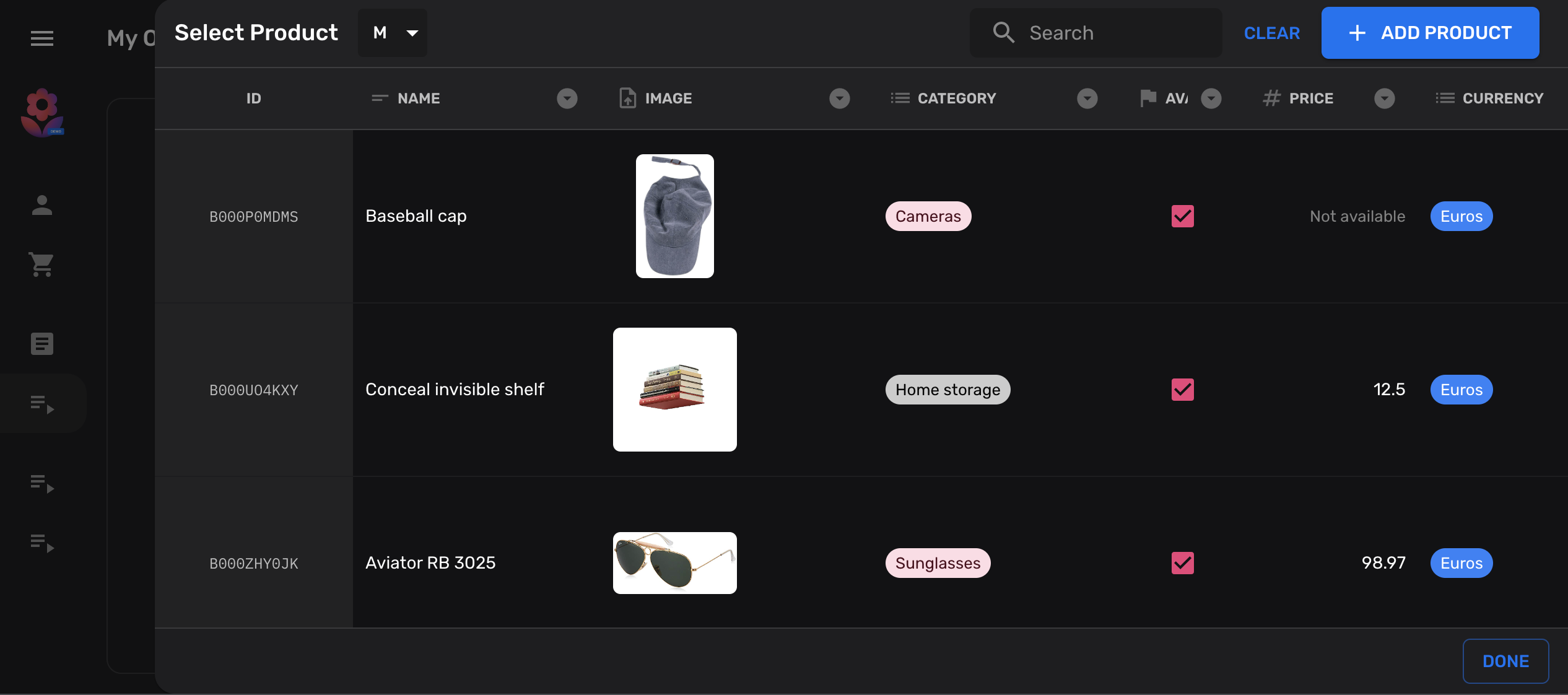
In diesem Tutorial zeigen wir, wie Sie Ihrer Kollektion einen Button hinzufügen, der es ermöglicht, Entities aus einer anderen Kollektion zu kopieren.
Es ist sehr üblich in NoSQL-Datenbanken wie Firestore, denormalisierte Daten in verschiedenen Kollektionen zu halten. Das heißt, die gleichen Informationen an mehreren Standorten zu speichern, anstatt in normalisierten Datenbanken, wo Informationen idealerweise nur einmal gespeichert werden sollten.
Ihre Kollektionen deklarieren
Abschnitt betitelt „Ihre Kollektionen deklarieren“Zu Illustrationszwecken erstellen wir zwei einfache products-Kollektionen,
von und nach denen wir kopieren werden:
import { buildCollection, buildProperties } from "@firecms/core";
export type Product = {    name: string;    price: number;}
// Common properties of our target and source collectionsexport const properties = buildProperties<Product>({    name: {        name: "Name",        validation: { required: true },        dataType: "string"    },    price: {        name: "Price",        validation: {            required: true,            min: 0        },        dataType: "number"    }});
// Source collectionexport const productsCollection = buildCollection<Product>({    name: "Products",    id: "products",    path: "products",    properties});
// Target collectionexport const productsCollectionCopy = buildCollection<Product>({    name: "Products copy target",    id: "products_copied",    path: "products_copied",    properties});
Eine benutzerdefinierte Aktion zu Ihrer Kollektion hinzufügen
Abschnitt betitelt „Eine benutzerdefinierte Aktion zu Ihrer Kollektion hinzufügen“Im nächsten Schritt fügen wir unserer Zielkollektion einen benutzerdefinierten Button hinzu. Dieser Button öffnet einen Referenzdialog und ermöglicht Benutzern die Auswahl einer Entity in der Quelle.
Dieses Beispiel verwendet einige von FireCMS bereitgestellte Hooks für die Entwicklung benutzerdefinierter Komponenten.
import { useCallback } from "react";import { Entity, EntityCollection, useDataSource, useReferenceDialog, useSnackbarController } from "@firecms/core";import { Button } from "@firecms/ui";
export type CopyEntityButtonProps = {    pathFrom: string;    pathTo: string;    collectionFrom: EntityCollection;    collectionTo: EntityCollection;};
export function CopyEntityButton({                                     pathFrom,                                     collectionFrom,                                     pathTo,                                     collectionTo                                 }: CopyEntityButtonProps) {
    // The datasource allows us to create new documents    const dataSource = useDataSource();
    // We use a snackbar to indicate success    const snackbarController = useSnackbarController();
    // We declare a callback function for the reference dialog that will    // create the new entity and show a snackbar when completed    const copyEntity = useCallback((entity: Entity<any> | null) => {        if (entity) {            dataSource.saveEntity({                path: pathTo,                values: entity.values,                entityId: entity.id,                collection: collectionTo,                status: "new"            }).then(() => {                snackbarController.open({                    type: "success",                    message: "Copied entity " + entity.id                });            });        }    }, [collectionTo, dataSource, pathTo, snackbarController]);
    // This dialog is used to prompt the selected collection    const referenceDialog = useReferenceDialog({        path: pathFrom,        collection: collectionFrom,        multiselect: false,        onSingleEntitySelected: copyEntity    });
    return (        <Button onClick={referenceDialog.open}>            Copy from {pathFrom}        </Button>    );}
Die benutzerdefinierte Kopieraktion hinzufügen
Abschnitt betitelt „Die benutzerdefinierte Kopieraktion hinzufügen“Sobald Ihre Komponente fertig ist, können Sie sie in die Actions Ihrer Kollektion einbinden:
import { buildCollection, CollectionActionsProps } from "@firecms/core";import { CopyEntityButton } from "./copy_button";import { Product, productsCollection, properties } from "./simple_product_collection";
export const productsCollectionCopy = buildCollection<Product>({    id: "products_copied",    name: "Products copy target",    path: "products_copied",    properties,    Actions: ({ path, collection }: CollectionActionsProps<Product>) =>        <CopyEntityButton            pathFrom={"products"}            collectionFrom={productsCollection}            pathTo={path}            collectionTo={collection}        />});
Vollständiger Code
Abschnitt betitelt „Vollständiger Code“import { useCallback } from "react";import { buildCollection, buildProperties, CollectionActionsProps, Entity, EntityCollection, useDataSource, useReferenceDialog, useSnackbarController} from "@firecms/core";import { Button } from "@firecms/ui";
type Product = { name: string; price: number;}
type CopyEntityButtonProps = { pathFrom: string; pathTo: string; collectionFrom: EntityCollection<any>; collectionTo: EntityCollection<any>;};
function CopyEntityButton({ pathFrom, collectionFrom, pathTo, collectionTo }: CopyEntityButtonProps) {
// The datasource allows us to create new documents const dataSource = useDataSource();
// We use a snackbar to indicate success const snackbarController = useSnackbarController();
// We declare a callback function for the reference dialog that will // create the new entity and show a snackbar when completed const copyEntity = useCallback((entity: Entity<any> | null) => { if (entity) { dataSource.saveEntity({ path: pathTo, values: entity.values, entityId: entity.id, collection: collectionTo, status: "new" }).then(() => { snackbarController.open({ type: "success", message: "Copied entity " + entity.id }); }); } }, [collectionTo, dataSource, pathTo, snackbarController]);
// This dialog is used to prompt the selected collection const referenceDialog = useReferenceDialog({ path: pathFrom, collection: collectionFrom, multiselect: false, onSingleEntitySelected: copyEntity });
return ( <Button onClick={referenceDialog.open}> Copy from {pathFrom} </Button> );}
// Common properties of our target and source collectionsconst properties = buildProperties<Product>({ name: { name: "Name", validation: { required: true }, dataType: "string" }, price: { name: "Price", validation: { required: true, min: 0 }, dataType: "number" }});
// Source collectionexport const productsCollection = buildCollection<Product>({ name: "Products", id: "products", path: "products", properties});
// Target collectionexport const productsCollectionCopy = buildCollection<Product>({ name: "Products copy target", id: "products_copied", path: "products_copied", properties, Actions: ({ path, collection }: CollectionActionsProps<Product>) => <CopyEntityButton pathFrom={"products"} collectionFrom={productsCollection} pathTo={path} collectionTo={collection} />});