

Copiar una entidad de una colección a otra
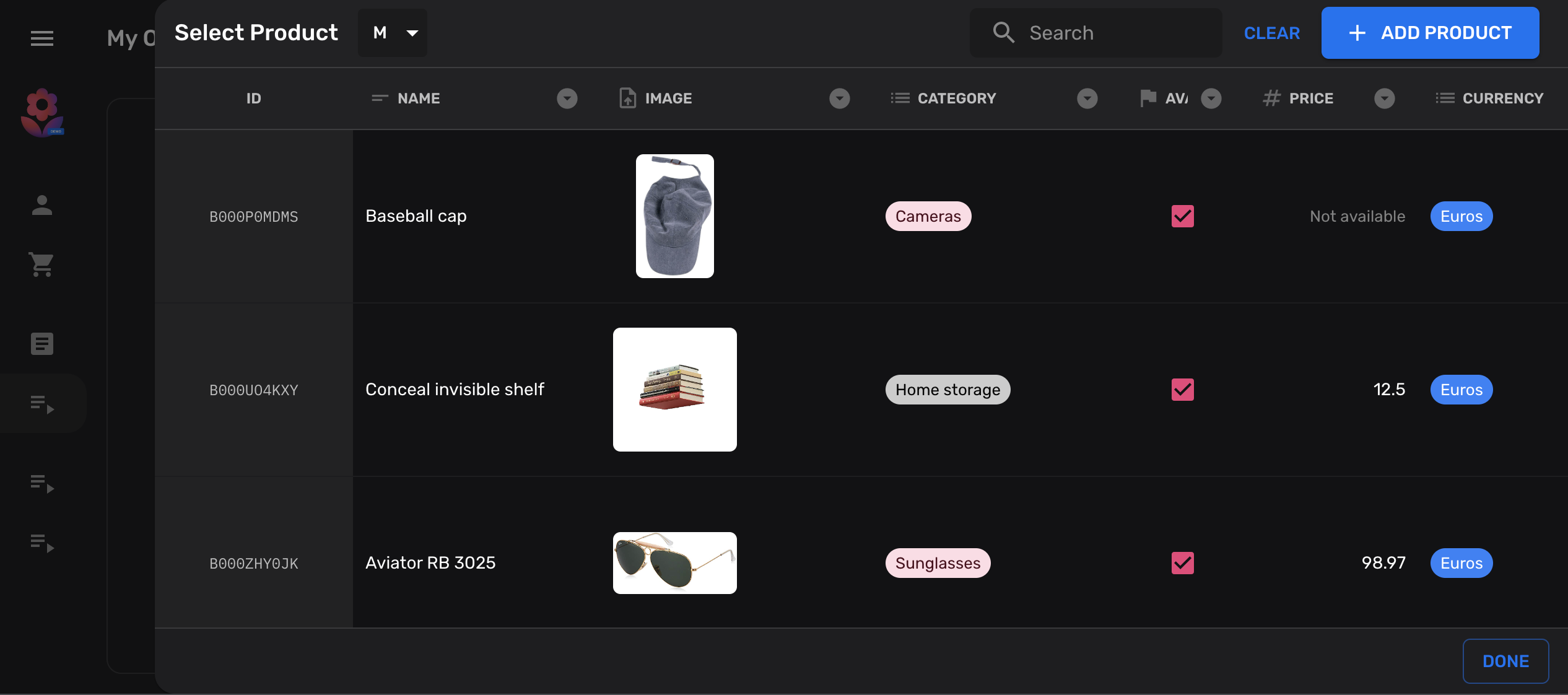
En este tutorial mostraremos cómo puedes añadir un botón a tu colección, que permitirá copiar entidades desde otra colección.
Es muy común en bases de datos NoSQL, como Firestore, mantener datos desnormalizados en diferentes colecciones. Es decir, mantener la misma información en múltiples ubicaciones, en lugar de bases de datos normalizadas donde la información idealmente debería almacenarse solo una vez.
Declara tus colecciones
Sección titulada «Declara tus colecciones»Para fines ilustrativos, creemos dos colecciones products simples,
desde y hacia las cuales copiaremos:
import { buildCollection, buildProperties } from "@firecms/core";
export type Product = {    name: string;    price: number;}
// Common properties of our target and source collectionsexport const properties = buildProperties<Product>({    name: {        name: "Name",        validation: { required: true },        dataType: "string"    },    price: {        name: "Price",        validation: {            required: true,            min: 0        },        dataType: "number"    }});
// Source collectionexport const productsCollection = buildCollection<Product>({    name: "Products",    id: "products",    path: "products",    properties});
// Target collectionexport const productsCollectionCopy = buildCollection<Product>({    name: "Products copy target",    id: "products_copied",    path: "products_copied",    properties});
Añadir una acción personalizada a tu colección
Sección titulada «Añadir una acción personalizada a tu colección»Para el siguiente paso añadiremos un botón personalizado a nuestra colección destino. Este botón abrirá un diálogo de referencia y permitirá a los usuarios seleccionar una entidad en la fuente.
Este ejemplo usa algunos hooks proporcionados por FireCMS para desarrollar componentes personalizados.
import { useCallback } from "react";import { Entity, EntityCollection, useDataSource, useReferenceDialog, useSnackbarController } from "@firecms/core";import { Button } from "@firecms/ui";
export type CopyEntityButtonProps = {    pathFrom: string;    pathTo: string;    collectionFrom: EntityCollection;    collectionTo: EntityCollection;};
export function CopyEntityButton({                                     pathFrom,                                     collectionFrom,                                     pathTo,                                     collectionTo                                 }: CopyEntityButtonProps) {
    // The datasource allows us to create new documents    const dataSource = useDataSource();
    // We use a snackbar to indicate success    const snackbarController = useSnackbarController();
    // We declare a callback function for the reference dialog that will    // create the new entity and show a snackbar when completed    const copyEntity = useCallback((entity: Entity<any> | null) => {        if (entity) {            dataSource.saveEntity({                path: pathTo,                values: entity.values,                entityId: entity.id,                collection: collectionTo,                status: "new"            }).then(() => {                snackbarController.open({                    type: "success",                    message: "Copied entity " + entity.id                });            });        }    }, [collectionTo, dataSource, pathTo, snackbarController]);
    // This dialog is used to prompt the selected collection    const referenceDialog = useReferenceDialog({        path: pathFrom,        collection: collectionFrom,        multiselect: false,        onSingleEntitySelected: copyEntity    });
    return (        <Button onClick={referenceDialog.open}>            Copy from {pathFrom}        </Button>    );}
Añadir la acción de copia personalizada
Sección titulada «Añadir la acción de copia personalizada»Después de que tu componente esté listo, puedes conectarlo a las Actions de tu colección:
import { buildCollection, CollectionActionsProps } from "@firecms/core";import { CopyEntityButton } from "./copy_button";import { Product, productsCollection, properties } from "./simple_product_collection";
export const productsCollectionCopy = buildCollection<Product>({    id: "products_copied",    name: "Products copy target",    path: "products_copied",    properties,    Actions: ({ path, collection }: CollectionActionsProps<Product>) =>        <CopyEntityButton            pathFrom={"products"}            collectionFrom={productsCollection}            pathTo={path}            collectionTo={collection}        />});
Código completo
Sección titulada «Código completo»import { useCallback } from "react";import { buildCollection, buildProperties, CollectionActionsProps, Entity, EntityCollection, useDataSource, useReferenceDialog, useSnackbarController} from "@firecms/core";import { Button } from "@firecms/ui";
type Product = { name: string; price: number;}
type CopyEntityButtonProps = { pathFrom: string; pathTo: string; collectionFrom: EntityCollection<any>; collectionTo: EntityCollection<any>;};
function CopyEntityButton({ pathFrom, collectionFrom, pathTo, collectionTo }: CopyEntityButtonProps) {
// The datasource allows us to create new documents const dataSource = useDataSource();
// We use a snackbar to indicate success const snackbarController = useSnackbarController();
// We declare a callback function for the reference dialog that will // create the new entity and show a snackbar when completed const copyEntity = useCallback((entity: Entity<any> | null) => { if (entity) { dataSource.saveEntity({ path: pathTo, values: entity.values, entityId: entity.id, collection: collectionTo, status: "new" }).then(() => { snackbarController.open({ type: "success", message: "Copied entity " + entity.id }); }); } }, [collectionTo, dataSource, pathTo, snackbarController]);
// This dialog is used to prompt the selected collection const referenceDialog = useReferenceDialog({ path: pathFrom, collection: collectionFrom, multiselect: false, onSingleEntitySelected: copyEntity });
return ( <Button onClick={referenceDialog.open}> Copy from {pathFrom} </Button> );}
// Common properties of our target and source collectionsconst properties = buildProperties<Product>({ name: { name: "Name", validation: { required: true }, dataType: "string" }, price: { name: "Price", validation: { required: true, min: 0 }, dataType: "number" }});
// Source collectionexport const productsCollection = buildCollection<Product>({ name: "Products", id: "products", path: "products", properties});
// Target collectionexport const productsCollectionCopy = buildCollection<Product>({ name: "Products copy target", id: "products_copied", path: "products_copied", properties, Actions: ({ path, collection }: CollectionActionsProps<Product>) => <CopyEntityButton pathFrom={"products"} collectionFrom={productsCollection} pathTo={path} collectionTo={collection} />});