

Copiare un'entità da una collezione a un'altra
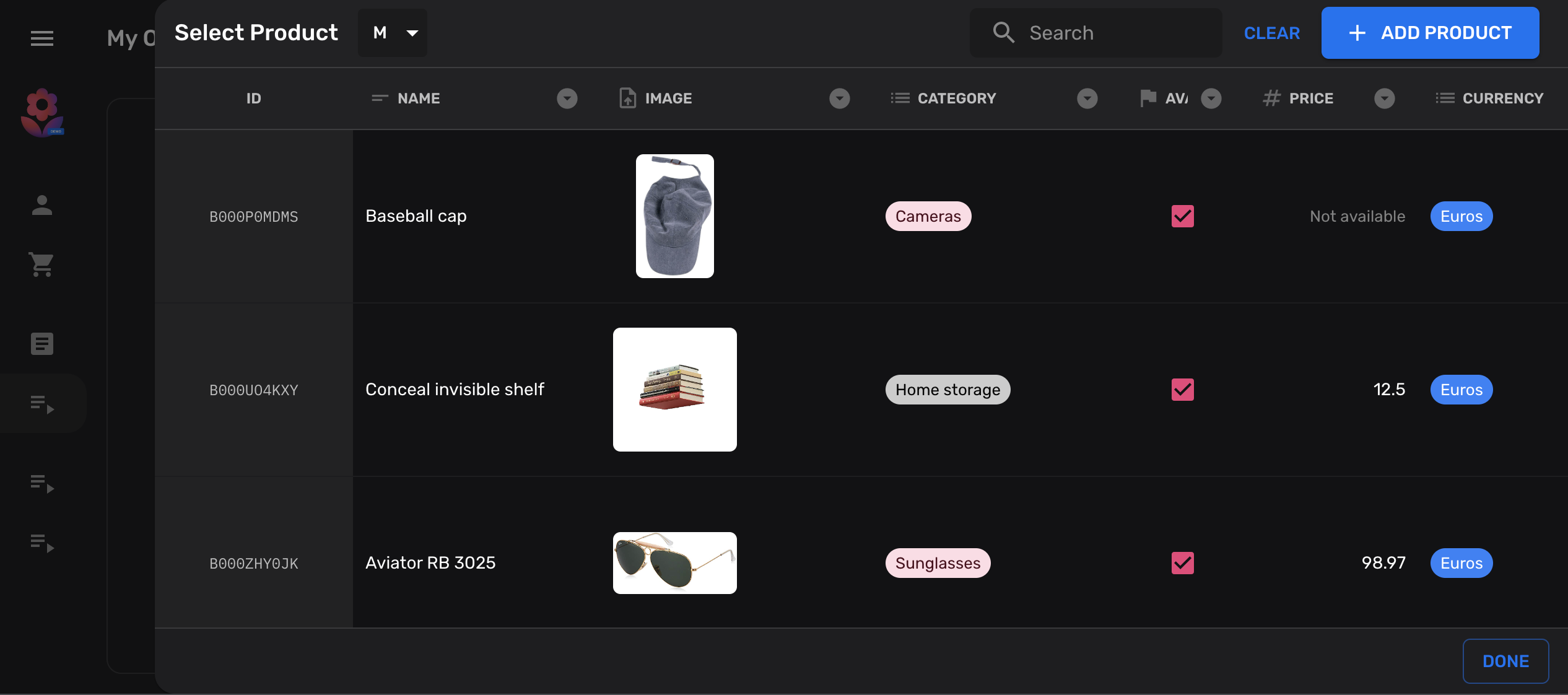
In questo tutorial ti mostreremo come aggiungere un pulsante alla tua collezione che ti permetterà di copiare entità da un’altra collezione.
È molto comune nei database NoSQL, come Firestore, mantenere dati denormalizzati in diverse collezioni. Cioè, mantenere le stesse informazioni in più posizioni, invece che nei database normalizzati dove le informazioni dovrebbero idealmente essere memorizzate solo una volta.
Dichiara le tue collezioni
Sezione intitolata “Dichiara le tue collezioni”Per scopi illustrativi, creiamo due semplici collezioni products, da cui e verso cui copieremo:
import { buildCollection, buildProperties } from "@firecms/core";
export type Product = {    name: string;    price: number;}
// Common properties of our target and source collectionsexport const properties = buildProperties<Product>({    name: {        name: "Name",        validation: { required: true },        dataType: "string"    },    price: {        name: "Price",        validation: {            required: true,            min: 0        },        dataType: "number"    }});
// Source collectionexport const productsCollection = buildCollection<Product>({    name: "Products",    id: "products",    path: "products",    properties});
// Target collectionexport const productsCollectionCopy = buildCollection<Product>({    name: "Products copy target",    id: "products_copied",    path: "products_copied",    properties});
Aggiungi un’azione personalizzata alla tua collezione
Sezione intitolata “Aggiungi un’azione personalizzata alla tua collezione”Per il passo successivo aggiungeremo un pulsante personalizzato alla nostra collezione di destinazione. Questo pulsante aprirà un dialogo di riferimento e consentirà agli utenti di selezionare un’entità nella sorgente.
import { useCallback } from "react";import { Entity, EntityCollection, useDataSource, useReferenceDialog, useSnackbarController } from "@firecms/core";import { Button } from "@firecms/ui";
export type CopyEntityButtonProps = {    pathFrom: string;    pathTo: string;    collectionFrom: EntityCollection;    collectionTo: EntityCollection;};
export function CopyEntityButton({                                     pathFrom,                                     collectionFrom,                                     pathTo,                                     collectionTo                                 }: CopyEntityButtonProps) {
    // The datasource allows us to create new documents    const dataSource = useDataSource();
    // We use a snackbar to indicate success    const snackbarController = useSnackbarController();
    // We declare a callback function for the reference dialog that will    // create the new entity and show a snackbar when completed    const copyEntity = useCallback((entity: Entity<any> | null) => {        if (entity) {            dataSource.saveEntity({                path: pathTo,                values: entity.values,                entityId: entity.id,                collection: collectionTo,                status: "new"            }).then(() => {                snackbarController.open({                    type: "success",                    message: "Copied entity " + entity.id                });            });        }    }, [collectionTo, dataSource, pathTo, snackbarController]);
    // This dialog is used to prompt the selected collection    const referenceDialog = useReferenceDialog({        path: pathFrom,        collection: collectionFrom,        multiselect: false,        onSingleEntitySelected: copyEntity    });
    return (        <Button onClick={referenceDialog.open}>            Copy from {pathFrom}        </Button>    );}
Aggiungi l’azione di copia personalizzata
Sezione intitolata “Aggiungi l’azione di copia personalizzata”Dopo che il tuo componente è pronto, puoi collegarlo nelle Actions della tua collezione:
import { buildCollection, CollectionActionsProps } from "@firecms/core";import { CopyEntityButton } from "./copy_button";import { Product, productsCollection, properties } from "./simple_product_collection";
export const productsCollectionCopy = buildCollection<Product>({    id: "products_copied",    name: "Products copy target",    path: "products_copied",    properties,    Actions: ({ path, collection }: CollectionActionsProps<Product>) =>        <CopyEntityButton            pathFrom={"products"}            collectionFrom={productsCollection}            pathTo={path}            collectionTo={collection}        />});
Codice completo
Sezione intitolata “Codice completo”import { useCallback } from "react";import { buildCollection, buildProperties, CollectionActionsProps, Entity, EntityCollection, useDataSource, useReferenceDialog, useSnackbarController} from "@firecms/core";import { Button } from "@firecms/ui";
type Product = { name: string; price: number;}
type CopyEntityButtonProps = { pathFrom: string; pathTo: string; collectionFrom: EntityCollection<any>; collectionTo: EntityCollection<any>;};
function CopyEntityButton({ pathFrom, collectionFrom, pathTo, collectionTo }: CopyEntityButtonProps) {
// The datasource allows us to create new documents const dataSource = useDataSource();
// We use a snackbar to indicate success const snackbarController = useSnackbarController();
// We declare a callback function for the reference dialog that will // create the new entity and show a snackbar when completed const copyEntity = useCallback((entity: Entity<any> | null) => { if (entity) { dataSource.saveEntity({ path: pathTo, values: entity.values, entityId: entity.id, collection: collectionTo, status: "new" }).then(() => { snackbarController.open({ type: "success", message: "Copied entity " + entity.id }); }); } }, [collectionTo, dataSource, pathTo, snackbarController]);
// This dialog is used to prompt the selected collection const referenceDialog = useReferenceDialog({ path: pathFrom, collection: collectionFrom, multiselect: false, onSingleEntitySelected: copyEntity });
return ( <Button onClick={referenceDialog.open}> Copy from {pathFrom} </Button> );}
// Common properties of our target and source collectionsconst properties = buildProperties<Product>({ name: { name: "Name", validation: { required: true }, dataType: "string" }, price: { name: "Price", validation: { required: true, min: 0 }, dataType: "number" }});
// Source collectionexport const productsCollection = buildCollection<Product>({ name: "Products", id: "products", path: "products", properties});
// Target collectionexport const productsCollectionCopy = buildCollection<Product>({ name: "Products copy target", id: "products_copied", path: "products_copied", properties, Actions: ({ path, collection }: CollectionActionsProps<Product>) => <CopyEntityButton pathFrom={"products"} collectionFrom={productsCollection} pathTo={path} collectionTo={collection} />});