

Copiando uma entidade de uma coleção para outra
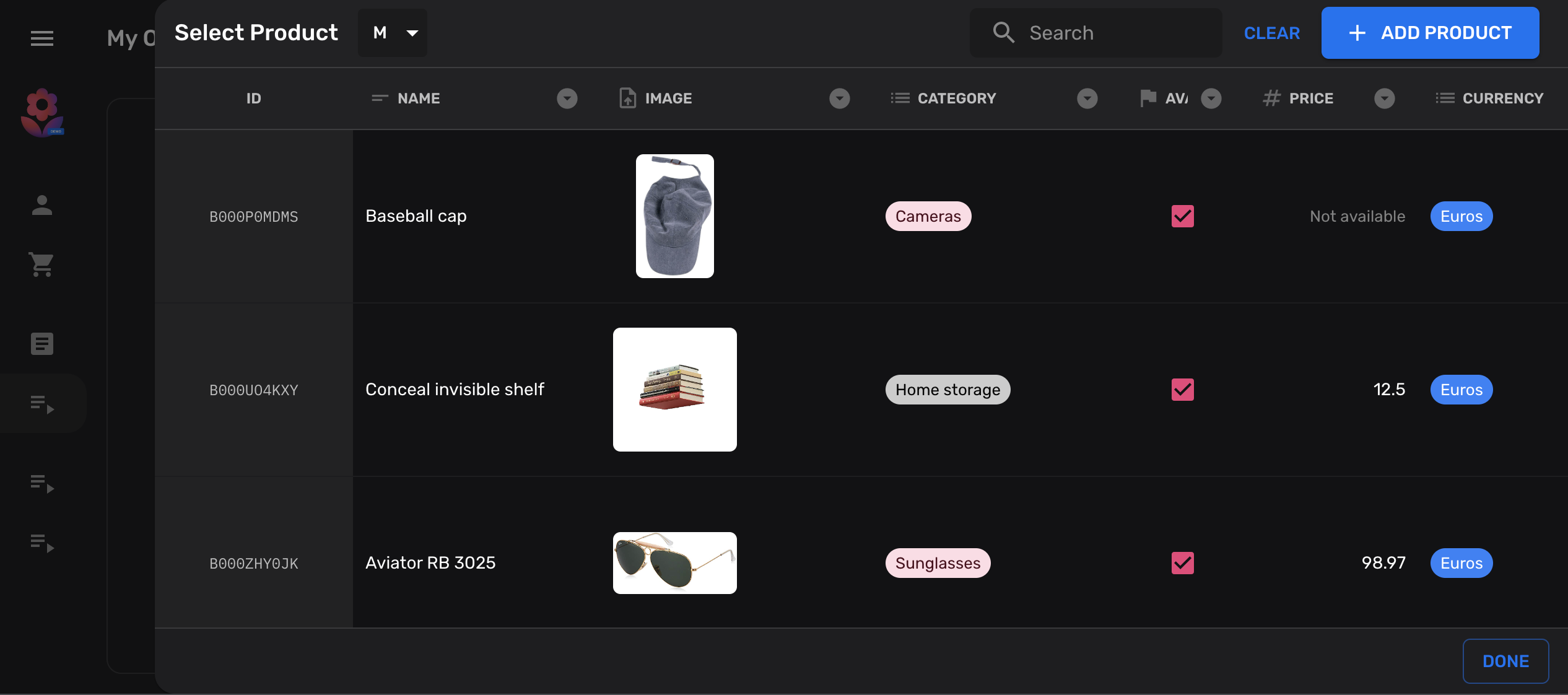
Neste tutorial vamos mostrar como você pode adicionar um botão à sua coleção, que permitirá copiar entidades de outra coleção.
É muito comum em bancos de dados NoSQL, como o Firestore, manter dados desnormalizados em diferentes coleções. Ou seja, manter as mesmas informações em múltiplos locais, em vez de bancos de dados normalizados onde as informações devem ser idealmente armazenadas apenas uma vez.
Declarar suas coleções
Seção intitulada “Declarar suas coleções”Para fins ilustrativos, vamos criar duas coleções simples de products,
das quais vamos copiar de e para:
import { buildCollection, buildProperties } from "@firecms/core";
export type Product = {    name: string;    price: number;}
// Common properties of our target and source collectionsexport const properties = buildProperties<Product>({    name: {        name: "Name",        validation: { required: true },        dataType: "string"    },    price: {        name: "Price",        validation: {            required: true,            min: 0        },        dataType: "number"    }});
// Source collectionexport const productsCollection = buildCollection<Product>({    name: "Products",    id: "products",    path: "products",    properties});
// Target collectionexport const productsCollectionCopy = buildCollection<Product>({    name: "Products copy target",    id: "products_copied",    path: "products_copied",    properties});
Adicionar uma ação personalizada à sua coleção
Seção intitulada “Adicionar uma ação personalizada à sua coleção”No próximo passo vamos adicionar um botão personalizado à nossa coleção destino. Este botão abrirá um diálogo de referência e permitirá que os usuários selecionem uma entidade na origem.
Este exemplo usa alguns hooks fornecidos pelo FireCMS para desenvolver componentes personalizados.
import { useCallback } from "react";import { Entity, EntityCollection, useDataSource, useReferenceDialog, useSnackbarController } from "@firecms/core";import { Button } from "@firecms/ui";
export type CopyEntityButtonProps = {    pathFrom: string;    pathTo: string;    collectionFrom: EntityCollection;    collectionTo: EntityCollection;};
export function CopyEntityButton({                                     pathFrom,                                     collectionFrom,                                     pathTo,                                     collectionTo                                 }: CopyEntityButtonProps) {
    // The datasource allows us to create new documents    const dataSource = useDataSource();
    // We use a snackbar to indicate success    const snackbarController = useSnackbarController();
    // We declare a callback function for the reference dialog that will    // create the new entity and show a snackbar when completed    const copyEntity = useCallback((entity: Entity<any> | null) => {        if (entity) {            dataSource.saveEntity({                path: pathTo,                values: entity.values,                entityId: entity.id,                collection: collectionTo,                status: "new"            }).then(() => {                snackbarController.open({                    type: "success",                    message: "Copied entity " + entity.id                });            });        }    }, [collectionTo, dataSource, pathTo, snackbarController]);
    // This dialog is used to prompt the selected collection    const referenceDialog = useReferenceDialog({        path: pathFrom,        collection: collectionFrom,        multiselect: false,        onSingleEntitySelected: copyEntity    });
    return (        <Button onClick={referenceDialog.open}>            Copy from {pathFrom}        </Button>    );}
Adicionar a ação de cópia personalizada
Seção intitulada “Adicionar a ação de cópia personalizada”Depois que seu componente estiver pronto, você pode conectá-lo às Actions das suas coleções:
import { buildCollection, CollectionActionsProps } from "@firecms/core";import { CopyEntityButton } from "./copy_button";import { Product, productsCollection, properties } from "./simple_product_collection";
export const productsCollectionCopy = buildCollection<Product>({    id: "products_copied",    name: "Products copy target",    path: "products_copied",    properties,    Actions: ({ path, collection }: CollectionActionsProps<Product>) =>        <CopyEntityButton            pathFrom={"products"}            collectionFrom={productsCollection}            pathTo={path}            collectionTo={collection}        />});
Código completo
Seção intitulada “Código completo”import { useCallback } from "react";import { buildCollection, buildProperties, CollectionActionsProps, Entity, EntityCollection, useDataSource, useReferenceDialog, useSnackbarController} from "@firecms/core";import { Button } from "@firecms/ui";
type Product = { name: string; price: number;}
type CopyEntityButtonProps = { pathFrom: string; pathTo: string; collectionFrom: EntityCollection<any>; collectionTo: EntityCollection<any>;};
function CopyEntityButton({ pathFrom, collectionFrom, pathTo, collectionTo }: CopyEntityButtonProps) {
// The datasource allows us to create new documents const dataSource = useDataSource();
// We use a snackbar to indicate success const snackbarController = useSnackbarController();
// We declare a callback function for the reference dialog that will // create the new entity and show a snackbar when completed const copyEntity = useCallback((entity: Entity<any> | null) => { if (entity) { dataSource.saveEntity({ path: pathTo, values: entity.values, entityId: entity.id, collection: collectionTo, status: "new" }).then(() => { snackbarController.open({ type: "success", message: "Copied entity " + entity.id }); }); } }, [collectionTo, dataSource, pathTo, snackbarController]);
// This dialog is used to prompt the selected collection const referenceDialog = useReferenceDialog({ path: pathFrom, collection: collectionFrom, multiselect: false, onSingleEntitySelected: copyEntity });
return ( <Button onClick={referenceDialog.open}> Copy from {pathFrom} </Button> );}
// Common properties of our target and source collectionsconst properties = buildProperties<Product>({ name: { name: "Name", validation: { required: true }, dataType: "string" }, price: { name: "Price", validation: { required: true, min: 0 }, dataType: "number" }});
// Source collectionexport const productsCollection = buildCollection<Product>({ name: "Products", id: "products", path: "products", properties});
// Target collectionexport const productsCollectionCopy = buildCollection<Product>({ name: "Products copy target", id: "products_copied", path: "products_copied", properties, Actions: ({ path, collection }: CollectionActionsProps<Product>) => <CopyEntityButton pathFrom={"products"} collectionFrom={productsCollection} pathTo={path} collectionTo={collection} />});