

Champs de sélection (Select)
Champ de sélection simple
Section intitulée « Champ de sélection simple »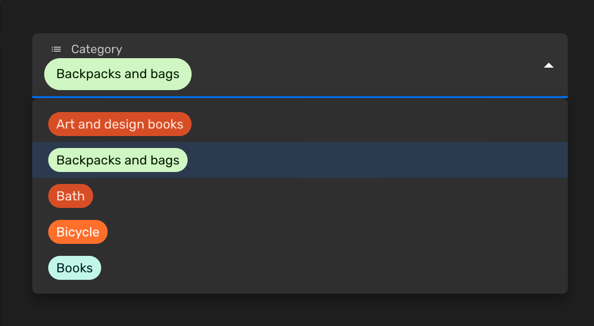
Vous pouvez utiliser un champ de sélection simple lorsque vous souhaitez permettre la sélection d’une seule valeur parmi un ensemble limité d’options. Chaque entrée aura une clé et une étiquette. Vous pouvez également personnaliser la couleur de chaque entrée ou désactiver certaines options.
Définissez la prop enumValues à une configuration valide dans une propriété string. Vous pouvez définir ces valeurs comme un tableau de EnumValueConfig ou simplement comme un objet avec des paires clé/valeur :
import { buildProperty } from "@firecms/core";
buildProperty({    dataType: "string",    name: "Category",    enumValues: {        art_design_books: "Art and design books",        backpacks: "Backpacks and bags",        bath: "Bath",        bicycle: "Bicycle",        books: "Books"    }});
ou
import { buildProperty } from "@firecms/core";
buildProperty({    dataType: "string",    name: "Currency",    enumValues: [        { id: "EUR", label: "Euros", color: "blueDark" },        { id: "DOL", label: "Dollars", color: "greenLight" }    ]});
Le type de données est string ou number.
En interne, le composant utilisé est SelectFieldBinding.
Champ de sélection multiple
Section intitulée « Champ de sélection multiple »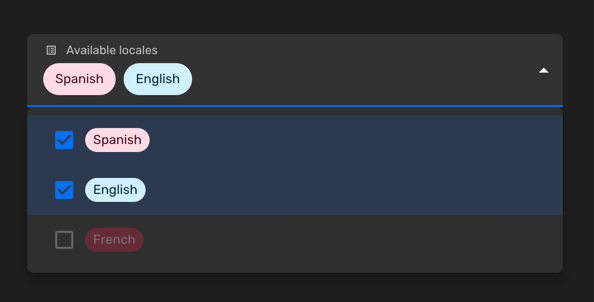
Vous pouvez utiliser un champ de sélection multiple lorsque vous souhaitez permettre la sélection de zéro ou plusieurs valeurs parmi un ensemble limité d’options.
import { buildProperty } from "@firecms/core";
buildProperty({    name: "Available locales",    dataType: "array",    of: {        dataType: "string",        enumValues: {            "es": "Spanish",            "en": "English",            "fr": {                id: "fr",                label: "French",                disabled: true            }        }    },    defaultValue: ["es"]});
Le type de données est array avec des propriétés string ou number comme prop of, utilisant des valeurs enum.
En interne, le composant utilisé est SelectFieldBinding.
Personnalisation des couleurs
Section intitulée « Personnalisation des couleurs »Vous pouvez choisir les couleurs parmi une liste de valeurs prédéfinies.
Vous pouvez également définir des couleurs personnalisées en utilisant la syntaxe HTML #AAAAAA :
import { buildProperty } from "@firecms/core";
buildProperty({    dataType: "string",    name: "Currency",    enumValues: [        { id: "EUR", label: "Euros", color: "blueDark" },        {            id: "DOL",            label: "Dollars",            color: {                color: "#FFFFFF",                text: "#333333",            }        }    ]});
import { ChipColorKey, ChipColorScheme } from "../components";import { hashString } from "./hash";
export const CHIP_COLORS: Record<string, ChipColorScheme> = { blueLighter: { color: "#cfdfff", text: "#102046" }, cyanLighter: { color: "#d0f0fd", text: "#04283f" }, tealLighter: { color: "#c2f5e9", text: "#012524" }, greenLighter: { color: "#d1f7c4", text: "#0b1d05" }, yellowLighter: { color: "#ffeab6", text: "#3b2501" }, orangeLighter: { color: "#fee2d5", text: "#6b2613" }, redLighter: { color: "#ffdce5", text: "#4c0c1c" }, pinkLighter: { color: "#ffdaf6", text: "#400832" }, purpleLighter: { color: "#ede2fe", text: "#280b42" }, grayLighter: { color: "#eee", text: "#040404" },
blueLight: { color: "#9cc7ff", text: "#102046" }, cyanLight: { color: "#77d1f3", text: "#04283f" }, tealLight: { color: "#72ddc3", text: "#012524" }, greenLight: { color: "#93e088", text: "#0b1d05" }, yellowLight: { color: "#ffd66e", text: "#3b2501" }, orangeLight: { color: "#ffa981", text: "#6b2613" }, redLight: { color: "#ff9eb7", text: "#4c0c1c" }, pinkLight: { color: "#f99de2", text: "#400832" }, purpleLight: { color: "#cdb0ff", text: "#280b42" }, grayLight: { color: "#ccc", text: "#040404" },
blueDark: { color: "#2d7ff9", text: "#fff" }, cyanDark: { color: "#18bfff", text: "#fff" }, tealDark: { color: "#20d9d2", text: "#fff" }, greenDark: { color: "#20c933", text: "#fff" }, yellowDark: { color: "#fcb400", text: "#fff" }, orangeDark: { color: "#ff6f2c", text: "#fff" }, redDark: { color: "#f82b60", text: "#fff" }, pinkDark: { color: "#ff08c2", text: "#fff" }, purpleDark: { color: "#8b46ff", text: "#fff" }, grayDark: { color: "#666", text: "#fff" },
blueDarker: { color: "#2750ae", text: "#cfdfff" }, cyanDarker: { color: "#0b76b7", text: "#d0f0fd" }, tealDarker: { color: "#06a09b", text: "#daf3e9" }, greenDarker: { color: "#338a17", text: "#d1f7c4" }, yellowDarker: { color: "#b87503", text: "#ffeab6" }, orangeDarker: { color: "#d74d26", text: "#fee2d5" }, redDarker: { color: "#ba1e45", text: "#ffdce5" }, pinkDarker: { color: "#b2158b", text: "#ffdaf6" }, purpleDarker: { color: "#6b1cb0", text: "#ede2fe" }, grayDarker: { color: "#444", text: "#eee" }};
export function getColorSchemeForKey(key: ChipColorKey): ChipColorScheme { return CHIP_COLORS[key];}
export function getColorSchemeForSeed(seed: string): ChipColorScheme { const hash: number = hashString(seed); const colorKeys = Object.keys(CHIP_COLORS); const index = hash % colorKeys.length; return CHIP_COLORS[colorKeys[index]];}