Full-Text Search in Firestore: The Problem Every Firebase Developer Faces

If you’ve worked with Firebase and Firestore, you’ve probably hit this wall: you can’t do full-text search.
TL;DR: Firestore doesn’t support full-text search. We built a Firebase Extension that deploys Typesense on a Compute Engine VM (~$7/month) and auto-syncs your Firestore data. Install, grant permissions, run one curl command, and you have typo-tolerant search.
You have a products collection with 10,000 items. A user types “blue wireless headphones” in a search box. In a SQL database, you’d write WHERE name LIKE '%blue%' OR description LIKE '%wireless%'. Simple.
In Firestore? That query doesn’t exist.
The Firestore Search Problem
Firestore is amazing for many things - real-time sync, offline support, scalability. But text search isn’t one of them. By design, Firestore only supports:
- Exact matches:
where("name", "==", "Blue Wireless Headphones")- useless for search - Prefix queries:
where("name", ">=", "Blue").where("name", "<=", "Blue\uf8ff")- only works for starts-with - Array contains: Good for tags, not for searching text fields
So what do you do when your users expect a search box that actually works?
The Traditional Solutions (And Their Problems)
1. Algolia / Elasticsearch / Meilisearch
The typical advice is “use a third-party search service.” This means:
- Setting up another service (more accounts, more APIs)
- Syncing your Firestore data (Cloud Functions to push changes)
- Paying per operation (Algolia charges per search)
- Managing two sources of truth
For a large enterprise, this makes sense. For most projects? It’s overkill.
2. Client-side Search
At FireCMS, we initially built in-browser text search. It loads documents into memory and searches locally. Works great for small collections, but try it with 50,000 products and watch the browser tab crash.
3. Cloud Functions + Manual Indexing
Some teams build custom solutions with Cloud Functions that maintain search indexes in Firestore. This works but requires significant engineering effort and ongoing maintenance.
A Better Solution: Typesense on Compute Engine
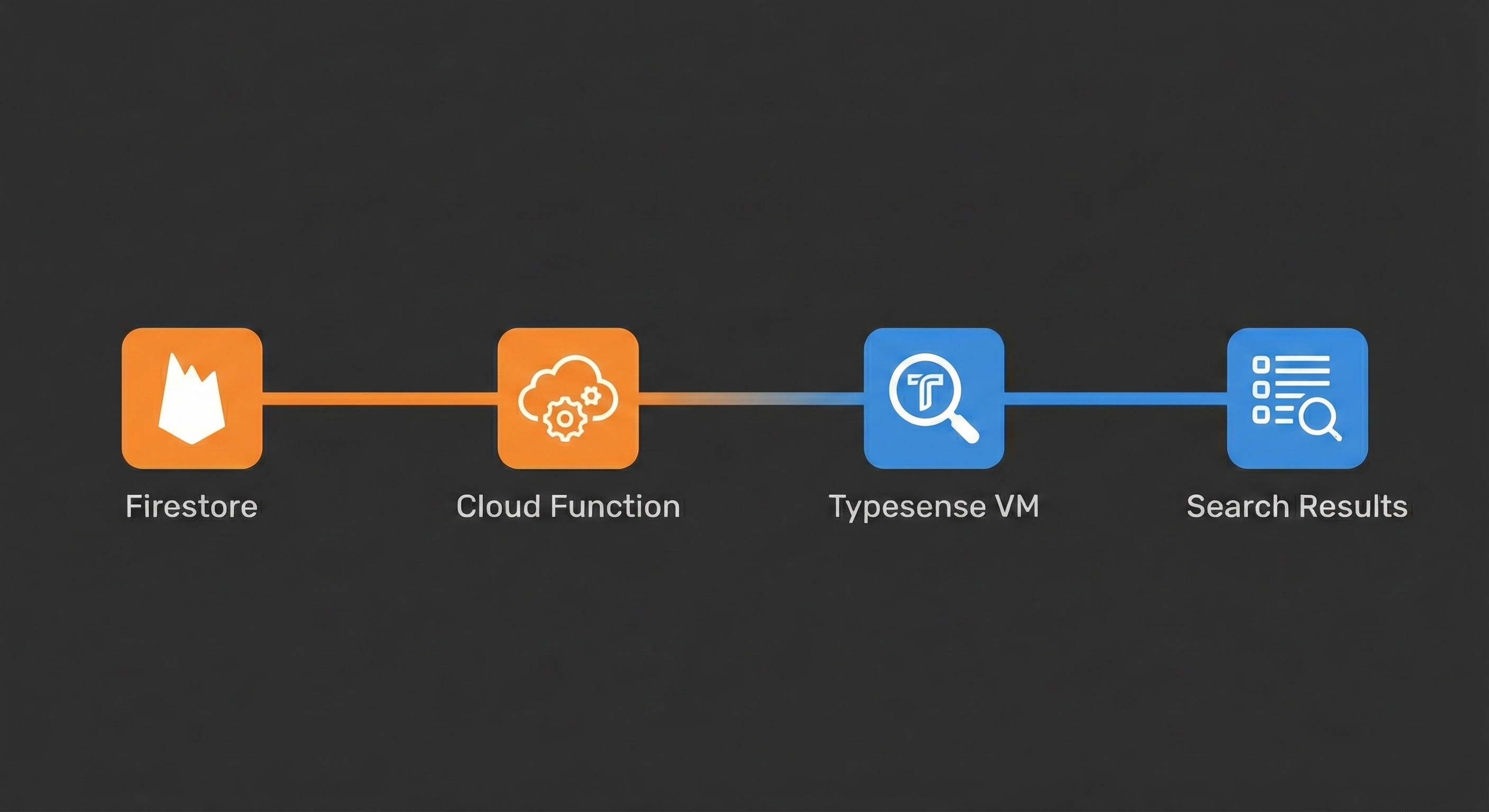
We built something different: a Firebase Extension that deploys Typesense on a Compute Engine VM and automatically syncs your Firestore data.
Why Typesense?
Typesense is an open-source search engine that’s:
- Fast: Sub-millisecond search responses
- Typo-tolerant: “headphnes” matches “headphones”
- Easy to use: Simple REST API, no complex query DSL
- Self-hostable: No per-query costs, you control the infrastructure
Why a Compute Engine VM?
Instead of a managed service with per-operation pricing, you get a dedicated VM:
| VM Type | Monthly Cost | Searches |
|---|---|---|
| e2-micro | ~$7 | Unlimited |
| e2-small | ~$14 | Unlimited |
Compare that to Algolia at $1+ per 1,000 search operations.
How the Extension Works
- Install the extension from GitHub
- Grant permissions to the extension service account
- Run provisioning - creates the VM with Typesense
- Search - your data syncs in real-time
# Installfirebase ext:install https://github.com/firecmsco/typesense-extension
# Provision (after granting roles)curl "https://REGION-PROJECT.cloudfunctions.net/ext-typesense-search-provisionSearchNode"
That’s it. Your Firestore collections are now searchable.
Real-time Sync
Every time a document is created, updated, or deleted in Firestore, a Cloud Function automatically syncs it to Typesense. No manual indexing, no sync scripts.
API Proxy
The extension includes an HTTPS proxy function, so you can search from browsers without exposing your Typesense server directly:
const response = await fetch( "https://REGION-PROJECT.cloudfunctions.net/ext-typesense-search-api/collections/products/documents/search", { method: "POST", headers: { "Content-Type": "application/json" }, body: JSON.stringify({ q: "blue wireless headphones", query_by: "name,description" }) });Using with FireCMS
If you’re using FireCMS, integration is one line:
import { buildFireCMSSearchController } from "@firecms/firebase";
const textSearchControllerBuilder = buildFireCMSSearchController({  region: "europe-west3",  extensionInstanceId: "typesense-search"});
Now your FireCMS collections have full-text search powered by Typesense.
When to Use This Extension
Good fit:
- Projects needing search without per-query costs
- Teams that want control over their search infrastructure
- Apps with moderate search traffic (thousands to millions of searches/month)
- Developers comfortable with GCP basics
Consider alternatives if:
- You need geo-search or vector/semantic search
- You have strict uptime SLAs requiring managed services
- Your search traffic is very low (the VM runs 24/7)
Get Started
The extension is open source and available now:
- GitHub: github.com/firecmsco/typesense-extension
- Documentation: See PREINSTALL.md and POSTINSTALL.md in the repo
Have questions? Join our Discord community or reach out at hello@firecms.co.
FireCMS | Documentation | GitHub | Discord
