The Back-Office Framework
Developers Actually Like
FireCMS is the developer-first framework you'll love to use. Build powerful, fast, and flexible internal tools, CRUD interfaces, and admin panels with React and TypeScript.
Trusted by developers at forward-thinking companies





Choose Your Path
Get started instantly with our managed Cloud — recommended for most teams. Or self-host for full infrastructure control.
FireCMS Cloud
Recommended for Most Teams
The fastest way to go live. Zero maintenance, full customization with custom React views, and a free trial to get started.
- Instant setup - no deployment needed
- Custom React views & components supported
- Free trial, automatic updates & maintenance
Self-Hosted
For Enterprise & Full Control
For teams that require full infrastructure ownership, custom auth, or specific compliance needs.
- Full source code access (MIT license)
- Deploy in your own infrastructure
- Custom auth, SSO, and compliance options
A Toolkit That Just Works
Everything you need. Nothing you don't.
Stop reinventing the wheel. FireCMS provides a production-ready toolkit of components and logic, so you can focus on the features that make your app unique.
import { buildProperty } from "@firecms/core";

const price = buildProperty({
name: "Price",
description: "Price with range validation",
dataType: "number",
validation: {
    required: true,
    requiredMessage: "Price must be between 0 and 1000",
    min: 0,
    max: 1000
}
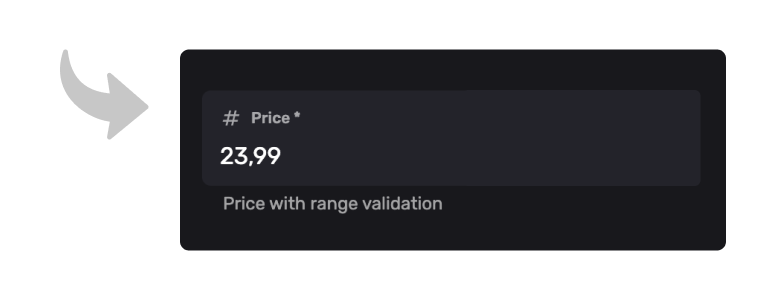
});
Schema as Code, with Validation
Define your data models in TypeScript. Your code is the single source of truth, giving you version control and type-safety. FireCMS automatically generates all CRUD views and forms, with built-in validation (required, min/max, regex) that works out of the box.
Radical React Extensibility
If you can build it in React, you can build it in FireCMS. Create your own custom form fields or build entirely new top-level views (like a custom dashboard) and add them to the main navigation. No black boxes.
Next-Generation Data Grid
Experience our high-performance admin grid. Designed specifically for developers, it offers spreadsheet-like inline editing, real-time sync, and effortless document management. Built to handle massive collections without breaking a sweat.
import { buildCollection } from "@firecms/core";

export const productsCollection = buildCollection({
    name: "Products",
    path: "products",
    callbacks: {
        onSave: async ({ values }) => {
            // e.g., send a notification
            await sendSlackMessage(`Product updated: ${values.name}`);

            // e.g., modify data before saving
            values.updatedAt = new Date();
            return values;
        }
    }
    // ...properties
});
Built-in Business Logic
Run your custom code during the data lifecycle. Use onSave, onDelete, and other callbacks to trigger cloud functions, send notifications, clean data, or integrate with third-party APIs right from your CMS configuration.
Everything for your
UI needs
If you need to create custom views or components, you can use our battle-tested FireCMS UI components.
Build Custom Views
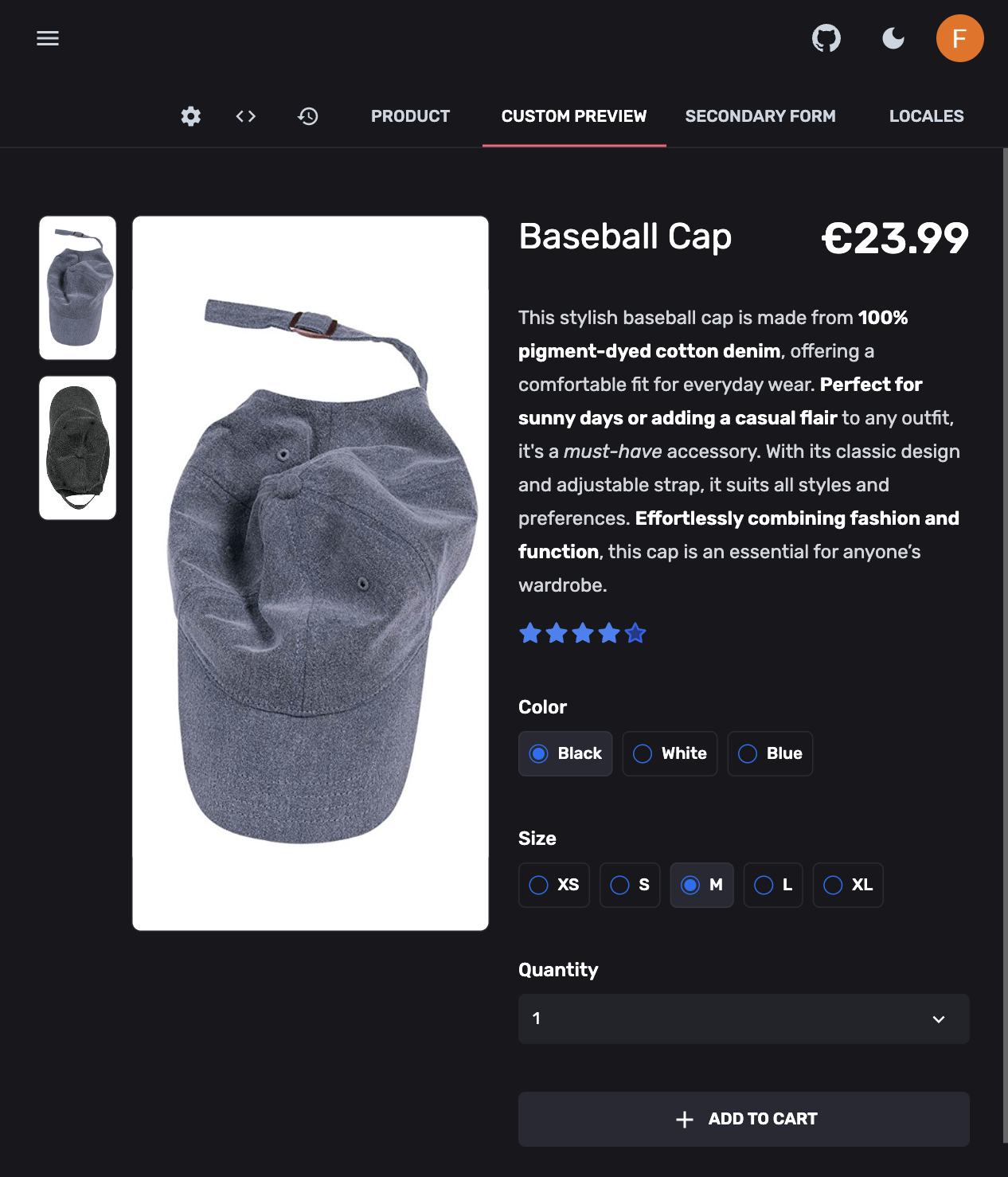
Use all the built-in data hooks to create your own React components and add them directly to the main navigation, or to documents
export function ProductDetailPreview({ modifiedValues }: {
    modifiedValues?: EntityValues<Product>;
}) {

    const snackbarController = useSnackbarController();
    const [quantity, setQuantity] = React.useState(1);

    if (!modifiedValues) {
        return <CenteredView>Please add some data to see the preview</CenteredView>;
    }

    const { name, price, description, images } = modifiedValues;
    const mainImage = images?.[0];

    return (
        <div className="p-8">
            <div className="grid md:grid-cols-2 gap-8 max-w-4xl mx-auto">

                {/* Product Image */}
                {mainImage && (
                    <img
                        alt="Product"
                        className="aspect-square object-cover w-full rounded-lg"
                        src={mainImage}
                    />
                )}

                {/* Product Details */}
                <div className="grid gap-4 content-center">
                    <div className="flex items-start">
                        <h1 className="flex-grow text-3xl font-bold">
                            {name ?? "Product name"}
                        </h1>
                        <div className="text-3xl font-semibold ml-auto">
                            ${price}
                        </div>
                    </div>

                    <Markdown source={description ?? ""} />

                    <QuantitySelect onSelected={(quantity) => snackbarController.open({
                                                    type: "success",
                                                    message: `Added \${ quantity } items to cart`
                                                })}/>
                </div>
            </div>
        </div>
    );
}
I'll help you update the status for users who signed up last month. Here's the code to do that:
const lastMonth = new Date();
lastMonth.setMonth(lastMonth.getMonth() - 1);

const users = await db.collection('users')
  .where('signupDate', '>=', lastMonth)
  .get();

const batch = db.batch();
users.docs.forEach(doc => {
  batch.update(doc.ref, { status: 'active' });
});

await batch.commit();
console.log("Updated ${users.size} users");Save Hours on Data-Ops
Stop writing one-off scripts for batch updates or complex queries. DataTalk lets you operate directly on your data in natural language, turning hours of tedious dev work into seconds of typing.
"Update status to 'active' for all users who signed up last month"
Over 20+ Powerful Data Fields
We've built all the complex fields you don't want to. Get a Notion-style rich text editor, file uploads to Firebase Storage, relational data (references), enums, arrays, maps, and more, all as pre-built components.
Start Your Self-Hosted Project
npx create-firecms-appReady to Build?
Start building in seconds with our free cloud tier or dive into the open-source docs.
Try FireCMS Cloud
The fastest way to get started. Perfect for MVPs, startups, and anyone who wants zero-hassle setup.
Start Building for FreeExplore the Docs
Dive into the open-source framework. Perfect for agencies, custom builds, and full control.
Read the Docs